How to Fix MB WhatsApp Ban: Temporary & Permanent Ban Issue
WhatsApp remains one of the most popular messaging platforms worldwide. Its features, ease of use, and instant communication capabilities make it an essential app for personal and professional interactions. However, many users encounter a common problem: their WhatsApp account gets banned, either temporarily or permanently. Among various modded versions of WhatsApp, MB WhatsApp APK Latest Version is widely used for its additional features. But, like other modified apps, MB WhatsApp users often face bans from official WhatsApp servers.
If you’re reading this, chances are you’ve experienced the frustration of being banned and are searching for effective ways to resolve the issue. In this comprehensive guide, we will explore the reasons behind MB WhatsApp bans, how to identify whether your ban is temporary or permanent, and most importantly, how to fix and prevent bans in the future.
Understanding WhatsApp Bans: Temporary vs. Permanent
Before diving into solutions, it’s essential to understand the difference between a temporary and a permanent ban on WhatsApp.
What Is a Temporary Ban?
A temporary ban, often lasting from a few hours to a few days, is typically imposed when WhatsApp detects suspicious activity or violations of its terms of service. During this period, you cannot send or receive messages using your account. Once the ban duration ends, your account usually restores its functionality without further issues.
Common causes of temporary bans include:
- Sending too many messages in a short period.
- Spamming or broadcasting unsolicited messages.
- Using modified versions of WhatsApp like MB WhatsApp.
- Reported by other users for suspicious behavior.
- Violating WhatsApp’s terms of service, intentionally or unintentionally.
What Is a Permanent Ban?
A permanent ban indicates that WhatsApp has deemed your account’s behavior fundamentally in violation of its policies, and as a result, your account is permanently disabled. Once banned permanently, you cannot access the account unless you take specific steps to appeal or create a new account with a different number.
Common causes of permanent bans include:
- Repeated violations after temporary bans.
- Using unauthorized modded apps like MB WhatsApp.
- Engaging in illegal activities or sharing prohibited content.
- Using third-party apps that alter WhatsApp’s core functionalities.
Why Does MB WhatsApp Get Banned?
MB WhatsApp Download is a popular modded version of the official WhatsApp, offering features like enhanced privacy options, themes, and customization. However, because it is not an official app, it violates WhatsApp’s terms of service, making it susceptible to bans.
Main reasons for MB WhatsApp bans include:
- Violation of WhatsApp policies: Using modded apps is against WhatsApp’s terms, which can lead to account suspension.
- Detection of modified APK: WhatsApp’s security systems detect modifications, flagging the app as suspicious.
- Sending spam or bulk messages: Using MB WhatsApp to send large volumes of messages can trigger bans.
- Frequent app updates or unauthorized modifications: Regular updates or tweaks may cause WhatsApp to identify the app as unauthorized.
- User reports: Other users reporting suspicious activity from your account.
How to Check if Your MB WhatsApp Is Banned
Identifying whether your account is temporarily or permanently banned is straightforward. Common symptoms include:
- You cannot send or receive messages.
- Your contacts report that they cannot see your status or profile updates.
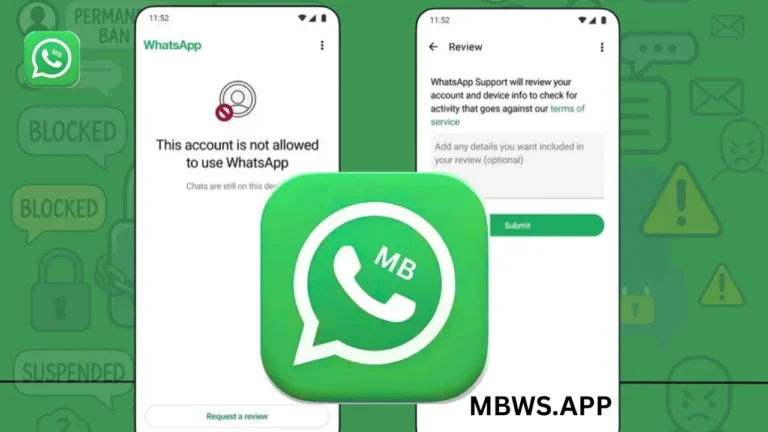
- You see a ban message when opening WhatsApp, such as “Your phone number is banned from WhatsApp.”
- Your app shows no activity or displays a message indicating your account is restricted.
If you experience these issues, it’s likely that your account has been banned.
How to Fix MB WhatsApp Ban: Step-by-Step Guide
While bans can be frustrating, there are several methods you can try to fix or bypass the ban. The effectiveness of these methods depends on whether the ban is temporary or permanent.
1. Confirm the Type of Ban
First, determine whether your ban is temporary or permanent. Attempt to log in after the ban period (if you know the duration). If you cannot access the account even after the ban expires, it’s likely permanent.
2. Wait Out the Ban
For Temporary Bans:
- The simplest solution is patience. Wait until the ban duration ends.
- Do not attempt to log in repeatedly during this period, as it may prolong the ban.
- Avoid using MB WhatsApp or any modded version during this time.
Tip: If you want to avoid future bans, switch to the official WhatsApp version.
3. Use Official WhatsApp Version
The most reliable way to prevent bans is to switch back to the official WhatsApp:
- Uninstall MB WhatsApp.
- Download the official app from the Google Play Store or Apple App Store.
- Verify your phone number again.
- Restore your chat backup if available.
Switching to the official app reduces the risk of bans and ensures compliance with WhatsApp’s policies.
4. Remove Modded APK and Install Clean Version
If you want to continue using MB WhatsApp or other mods:
- Uninstall the current MB WhatsApp app.
- Clear data and cache from your device settings.
- Download a clean, latest version of MB WhatsApp from a trusted source.
- Install it without any other mods or tweaks.
- Avoid using third-party add-ons that violate WhatsApp policies.
5. Change Your Phone Number
If your account is permanently banned and you wish to regain access:
- Register with a new phone number.
- Use the official WhatsApp app.
- Verify the new number.
- Be cautious with mods to avoid immediate bans.
6. Use a Different Device
Sometimes, bans are device-specific. You can try:
- Installing MB WhatsApp on a different device.
- Using a different phone number.
- But note that if your account is permanently banned, this may not work unless you switch to a new number.
7. Use a VPN or Proxy (With Caution)
Some users try to bypass bans using VPNs or proxies to change their IP address. While this may temporarily access the app, it does not address the core issue and can violate WhatsApp policies. Use this method with caution, understanding it may lead to further bans.
8. Contact WhatsApp Support
Although WhatsApp does not often respond to ban appeals, you can try:
- Sending an email to WhatsApp’s support team explaining your situation.
- Be polite and honest, especially if you believe your ban was a mistake.
- Note that appeals are rarely successful if you’re using modded apps.
How to Prevent Future MB WhatsApp Bans
Prevention is better than cure. To avoid bans on MB WhatsApp or any modded app, follow these tips:
1. Limit Message Sending
Avoid sending excessive messages, especially to strangers or in bulk. Spamming is a major trigger for bans.
2. Avoid Using Mods for Critical Conversations
Use the official WhatsApp for sensitive or important communication to minimize the risk of bans.
3. Don’t Use Unauthorized Mods
Stick to trusted versions if you choose to use mods. Always update to the latest versions from reliable sources.
4. Respect WhatsApp’s Terms of Service
Read and understand WhatsApp’s policies. Avoid behaviors that violate their rules, such as sharing prohibited content or engaging in spam.
5. Backup Data Regularly
Regularly backing up your chats ensures you can restore messages if you need to uninstall or switch apps.
6. Limit Use of Unauthorized Features
Many mods offer features like hiding online status, hiding blue ticks, or customizing themes. Use these features responsibly to avoid raising suspicion.
7. Keep Your App Updated
Using outdated versions of MB WhatsApp increases the risk of detection. Always install the latest versions from trusted sources.
Legal and Ethical Considerations
While using MB WhatsApp or other mods might provide additional features, it’s important to understand the legal and ethical implications:
- Violation of Terms: Using modded apps violates WhatsApp’s terms of service, which can lead to permanent bans.
- Security Risks: Modified apps may contain malware or security vulnerabilities.
- Privacy Concerns: Mods might compromise your data or send it to third parties.
Using the official WhatsApp app ensures compliance and security.
Final Thoughts
Getting banned from MB WhatsApp Updated can be a frustrating experience, but understanding the nature of the ban and following the right procedures can help you regain access or prevent future issues. Remember that using the official WhatsApp version is the safest and most reliable way to ensure uninterrupted communication.
If you choose to continue using mods like MB WhatsApp, do so responsibly, respecting the platform’s rules and guidelines. Always prioritize security and privacy, and consider switching back to the official app for long-term peace of mind.
Disclaimer: This guide is for informational purposes only. Using modded versions of WhatsApp carries inherent risks and may violate platform policies. Proceed with caution and at your own risk.
Would you like me to format this into a downloadable document or expand on any specific section?